Every side project starts the same way.
“This one will be small.”
Mine lasted about three hours.
At Meandair, we originally set out to build a modern weather app for iOS. The idea was simple: learn a few new technologies, experiment, maybe publish something one day, and call it a success.
Then my brain did what it always does.
“Wouldn’t it be cool if it also worked on Android?”
Four weeks later I wasn’t just building an iOS app anymore. I was learning Kotlin Multiplatform (KMP), fighting Gradle every now and then, and trying to figure out how to share as much code as possible without making either platform feel unnatural.
Was it worth it?
Absolutely.
The goal of the first phase wasn’t to build dozens of features. It was to answer one simple question:
Can Kotlin Multiplatform become a solid foundation for a real weather application?
Spoiler: yes.

Why We Didn’t Start with Features
As developers, we love shipping features.
Animations.
Widgets.
Weather maps.
Fancy gradients.
The problem?
You can build all of that on top of a terrible architecture.
Eventually you’ll spend more time fixing yesterday’s shortcuts than building tomorrow’s ideas.
I’ve learned that lesson before.
So this project started differently.
Instead of asking:
“What feature should I build first?”
I asked:
“What needs to exist before building any feature becomes easy?”
That mindset shaped everything I built during the first month of developing Meandair’s weather application.
Setting Up the Kotlin Multiplatform Project
The first step was creating the Kotlin Multiplatform project itself.
Nothing glamorous.
No shiny UI.
No weather forecasts.
Just project structure.
I configured Android and iOS targets, created the shared module, organized Gradle, and prepared dependency management.
It’s probably the least exciting screenshot you’ll ever see in a blog post.
But it’s also one of the most important parts of the entire project.
A stable architecture is a lot like building a house.
Nobody posts pictures of the concrete foundation on Instagram.
But if the foundation is weak, nobody cares how beautiful the roof looks.
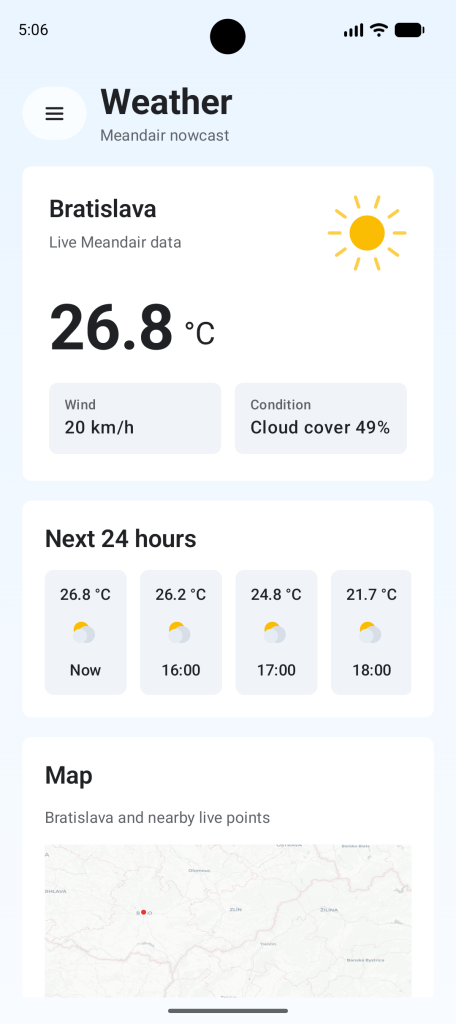
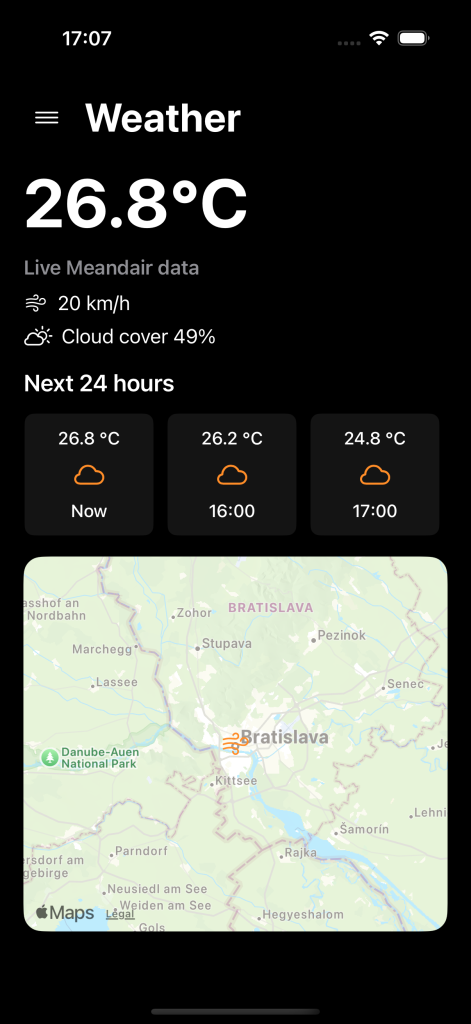
Android and iOS – our first UI.
Every Crazy Idea Gets a GitHub Issue
I have a terrible habit.
Every five minutes I think of another feature.
“Wouldn’t it be cool if…”
That’s dangerous.
Not because the ideas are bad.
Because implementing every idea immediately is.
That’s why GitHub Issues became my second brain.
Every feature request, improvement, or random 2 a.m. inspiration gets its own ticket.
Some of them will become real features.
Some of them will quietly stay exactly where they belong.
And that’s perfectly fine.
The goal isn’t to build everything.
The goal is to build the right things.
Validating the Networking Layer with Ktor
Once the project structure was ready, it was finally time to fetch some actual weather.
For networking I chose Ktor, together with Kotlin Serialization for parsing API responses.
The important part wasn’t downloading JSON.
Any HTTP client can do that.
The interesting question was whether the shared Kotlin module could become the single source of truth for networking on both Android and iOS.
After the first successful API call, I finally had proof that it could.
Sometimes the most satisfying feature is simply seeing data arrive without exploding.
Keeping API Models Away from the UI
One mistake I’ve made before is using API models everywhere.
It feels fast.
Until the API changes.
Suddenly your entire application depends on someone else’s JSON structure.
Not ideal.
Instead, I introduced a clear separation between:
- DTOs representing the API
- Domain models representing the application
- Repository interfaces connecting everything together
It takes slightly longer to build.
It saves a ridiculous amount of pain later.
Future me appreciates that.
Present me is slowly learning to listen to future me.

Building the First Vertical Slice
Architecture diagrams are nice.
Running applications are better.
The last goal of Phase 1 was connecting everything together.
API → Repository → Shared Module → UI
Nothing revolutionary.
Just one complete flow.
The app can now display the current weather together with a basic forecast using shared business logic while keeping native Android and iOS user interfaces.
This was probably the biggest milestone so far.
Not because the feature itself is complicated.
Because it proves the architecture actually works.
Turns out diagrams don’t impress users nearly as much as an app that actually loads weather data.
Who knew?
What I Learned After Four Weeks
The biggest lesson?
Slow is fast.
Spending extra time on architecture feels frustrating when all you want is to build features.
But every hour invested into clean boundaries, repositories, and shared modules pays back later.
Another lesson is that Kotlin Multiplatform should be validated as early as possible.
It’s not enough for shared code to compile.
It needs to feel natural on both Android and iOS.
Finally, building one complete vertical slice taught me much more than creating five isolated layers ever could.
Software isn’t built layer by layer.
It’s built by connecting everything together.
And yes…
Gradle will still find creative ways to humble you.

What’s Next?
With the foundation finally in place, the fun part begins.
The next phase focuses on making the weather app feel like a real product rather than a proof of concept.
That means:
- richer forecasts
- a more polished UI
- improving communication between Android and iOS
- more real-world features
- and, hopefully, fewer architectural surprises
The architecture has proven itself.
Now it’s time to see how far I can push Kotlin Multiplatform in a production-style application at Meandair.
Hopefully with fewer Gradle errors than during the first month.
Although…
I wouldn’t bet on it.
If you’re interested in Kotlin Multiplatform, Android development, iOS development, clean architecture, or simply curious about how Meandair is building a cross-platform weather application, stay tuned.
This is only the beginning.








[…] the end of Phase 1, my Kotlin Multiplatform weather app could fetch weather data from Meandair and put it on the […]